Protobuf and gRPC ramp-up project
It’s been a couple of years since I worked with gRPC and Protocol Buffers. It was part of the online Master of Science in Computer Science (OMSCS) through Georgia Tech and something that we touched on in the operating systems course, but other than that, I have basically no recent experience with something that is core to a bunch of systems.
Truthfully, what stuck with me more from OMSCS was the RPC/gRPC part, and the Protocol Buffers side didn’t stick as well. Now that I’m onboarding at Temporal, I see quite a bit of use of Protocol Buffers, especially in SDKs that share a common contract with the server. Now I’m refreshing myself on Protocol Buffers and gRPC through a very small sample project.
Project overview
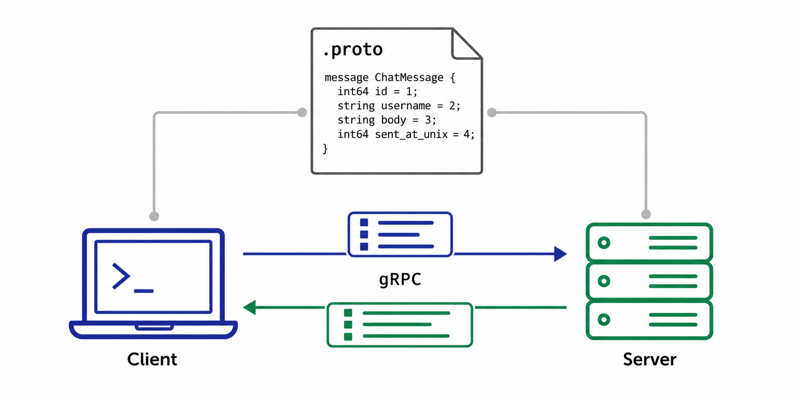
We’re going to create a very basic chat server and client application. The client application can retrieve a subset of recent messages or send a message from the user.
Tutorial
Install a current Go release before starting. The client uses slices.Backward, introduced in Go 1.23; the latest dependencies may require a newer version.
For ease of construction, we can back our “chat service” with SQLite. I’m going to construct both the client and server in Go because it’s a language I enjoy for its affordances (like :=).
client
  |
  | gRPC
  | protobuf messages
  v
chat server
  |
  | database/sql
  v
SQLite
Protobuf and gRPC have distinct jobs. The key idea is that the .proto file defines the messages and service contract, while your Go server implements the service and gRPC handles the remote calls.
1. What we’re going to build
We’ll support two operations:
SendMessage
GetMessages
If we exposed these operations as CLI subcommands, the two actions could look like this (the client we build below uses interactive prompts instead):
chat send "drew" "hello world"
chat history 5
Internally:
CLI client
    │
    │ SendMessageRequest protobuf
    ▼
gRPC ChatService.SendMessage()
    │
    │ INSERT
    ▼
SQLite

SQLite
    │
    │ SELECT
    ▼
gRPC ChatService.GetMessages()
    │
    │ GetMessagesResponse protobuf
    ▼
CLI client
This (simplistically) mirrors how many real service-oriented systems work.
2. Create the Go project
Start with:
mkdir grpc-chat
cd grpc-chat

go mod init example.com/grpc-chat

mkdir -p proto
mkdir -p cmd/server
mkdir -p cmd/client
Our eventual structure:
grpc-chat/
├── cmd/
│   ├── server/
│   │   └── main.go
│   └── client/
│       └── main.go
├── proto/
│   ├── chat.proto
│   ├── chat.pb.go
│   └── chat_grpc.pb.go
├── go.mod
└── chat.db
3. Defining the core construct: chat messages
Create:
proto/chat.proto
with:
syntax = "proto3";

package chat;

option go_package = "example.com/grpc-chat/proto;chatpb";

message ChatMessage {
    int64 id = 1;
    string username = 2;
    string body = 3;
    int64 sent_at_unix = 4;
}
With that small snippet we’ve started establishing a language-independent contract that can be reused between server and client implementations.
For example:
string body = 3;
means:
Field number 3 of
ChatMessagerepresents a string calledbody.
The Go generator will turn ChatMessage into a Go type when we get to it in step 6. Protobuf’s generated Go types implement its message interface and can be serialized into protobuf’s wire format.
Conceptually you’ll get something like:
type ChatMessage struct {
    Id         int64
    Username   string
    Body       string
    SentAtUnix int64
}
…but you didn’t have to write that struct yourself.
4. Add request and response messages
We’ll use explicit request and response types for our RPC methods. These can represent inputs to an operation or wrap a domain object. In protobuf, each of these types is called a message—an unfortunately overloaded term for a chat tutorial.
message SendMessageRequest {
  string username = 1;
  string body = 2;
}

message SendMessageResponse {
  ChatMessage message = 1;
}

message GetMessagesRequest {
  int64 message_count = 1;
}

message GetMessagesResponse {
  repeated ChatMessage messages = 1;
}
We also see another protobuf construct, repeated:
repeated ChatMessage messages = 1;
Which means:
0..N ChatMessage values
and becomes roughly:
[]*ChatMessage
in Go.
5. Define how RPC handles messages
At the bottom of the same .proto file, add:
service ChatService {
  rpc SendMessage(SendMessageRequest)
      returns (SendMessageResponse);

  rpc GetMessages(GetMessagesRequest)
      returns (GetMessagesResponse);
}
This is where protobuf becomes much more interesting than merely defining structures.
You’re saying:
There exists a service called
ChatService, and it exposes these strongly typed procedures.
For example:
rpc SendMessage(SendMessageRequest)
    returns (SendMessageResponse);
defines this conceptual function:
SendMessage(
    SendMessageRequest
) -> SendMessageResponse
but without tying it to Go.
A Java application, Python application, or Go application can all implement or call this service.
6. Generate the Go code
We’ll install protobuf for access to the protoc utility.
On macOS with Homebrew installed, run:
brew install protobuf
You’ll need two Go plugins to enable protoc to generate the Go structs and gRPC interfaces:
go install google.golang.org/protobuf/cmd/protoc-gen-go@latest
go install google.golang.org/grpc/cmd/protoc-gen-go-grpc@latest
export PATH="$PATH:$(go env GOPATH)/bin"
Run protoc to generate both protobuf model Go structs and RPC service interfaces:
protoc --go_out=. --go_opt=paths=source_relative \
    --go-grpc_out=. --go-grpc_opt=paths=source_relative \
    proto/chat.proto
You should now have:
proto/chat.pb.go
proto/chat_grpc.pb.go
Taking a quick look at each file, without diving into their 100-400 lines of code…
chat.pb.go
This is our models file, defining:
ChatMessage
SendMessageRequest
GetMessagesResponse
...
chat_grpc.pb.go
Contains the RPC plumbing:
ChatServiceClient

ChatServiceServer

RegisterChatServiceServer(...)
and methods corresponding to:
SendMessage
GetMessages
This division is important:
chat.proto
   │
   ├── protobuf generator
   │      ↓
   │   chat.pb.go
   │   data types
   │
   └── gRPC generator
          ↓
       chat_grpc.pb.go
       RPC interface/client/server code
The protobuf Go generator handles messages; the separate gRPC plugin generates service support.
7. Add our server and client dependencies
We’ll use gRPC and a pure-Go SQLite driver in our Go-based server and client applications by adding these Go modules, still from the root of the project:
go get google.golang.org/grpc
go get google.golang.org/protobuf
go get modernc.org/sqlite
modernc.org/sqlite plugs into Go’s standard database/sql API and registers the driver as "sqlite".
That means our application code can mostly use standard Go SQL interactions and keep the persistence overhead minimal:
db, err := sql.Open("sqlite", "chat.db")
8. Build the server
Create a new file:
cmd/server/main.go
Start with the imports, database field, and server definition. Some imports will only be used once you add the remaining functions below:
package main

import (
    "context"
    "database/sql"
    "log"
    "net"
    "time"

    chatpb "example.com/grpc-chat/proto"

    "google.golang.org/grpc"

    _ "modernc.org/sqlite"
)

type chatServer struct {
    chatpb.UnimplementedChatServiceServer

    db *sql.DB
}
This line matters:
chatpb.UnimplementedChatServiceServer
The generated ChatServiceServer interface gives us the server contract. Embedding UnimplementedChatServiceServer provides default methods that return an “unimplemented” error and supports forward compatibility when new RPCs are added. Our methods below replace those defaults.
9. Initialize SQLite on startup
Add to cmd/server/main.go:
func initializeDatabase() (*sql.DB, error) {
    db, err := sql.Open("sqlite", "chat.db")
    if err != nil {
        return nil, err
    }

    schema := `
    CREATE TABLE IF NOT EXISTS messages (
        id INTEGER PRIMARY KEY AUTOINCREMENT,
        username TEXT NOT NULL,
        body TEXT NOT NULL,
        sent_at_unix INTEGER NOT NULL
    );
    `

    if _, err := db.Exec(schema); err != nil {
        db.Close()
        return nil, err
    }

    return db, nil
}
We now have a database model:
messages

id | username | body        | sent_at_unix
---|----------|-------------|-------------
1  | drew     | hello world | ...
10. Implement our first RPC
Let’s implement the server receiving a message through the client’s SendMessage call:
rpc SendMessage(SendMessageRequest)
    returns (SendMessageResponse);
Add this Go method to cmd/server/main.go:
func (s *chatServer) SendMessage(
	ctx context.Context,
	req *chatpb.SendMessageRequest,
) (*chatpb.SendMessageResponse, error) {

	timestamp := time.Now().Unix()

	result, err := s.db.ExecContext(
		ctx,
		`
        INSERT INTO messages(
            username,
            body,
            sent_at_unix
        )
        VALUES (?, ?, ?)
        `,
		req.Username,
		req.Body,
		timestamp,
	)
	if err != nil {
		return nil, err
	}

	id, err := result.LastInsertId()
	if err != nil {
		return nil, err
	}

	msg := &chatpb.ChatMessage{
		Id:         id,
		Username:   req.Username,
		Body:       req.Body,
		SentAtUnix: timestamp,
	}

	return &chatpb.SendMessageResponse{
		Message: msg,
	}, nil
}
Following the overall interaction lifecycle to ensure our understanding of this end-to-end…
-
Client creates the request (we’ll implement this shortly):
&chatpb.SendMessageRequest{ Username: "drew", Body: "hello world", } -
gRPC serializes it and passes it through the network as binary:
Go object ↓ protobuf binary ↓ network -
The server receives:
req *chatpb.SendMessageRequest -
Then the server processes the request:
protobuf request ↓ server Go function ↓ SQL INSERT ↓ SQLite -
After inserting it, the server constructs the response:
&chatpb.SendMessageResponse{ Message: ... } -
Then gRPC does the reverse:
 Go response
     ↓
 protobuf serialization
     ↓
 network
     ↓
 client
11. Implement the message retrieval RPC
Next, we need to let the client request recent chat messages. This is another client-initiated RPC, with the messages returned in the response. Add to cmd/server/main.go:
func (s *chatServer) GetMessages(
	ctx context.Context,
	req *chatpb.GetMessagesRequest,
) (*chatpb.GetMessagesResponse, error) {

	rows, err := s.db.QueryContext(
		ctx,
		`
        SELECT
            id,
            username,
            body,
            sent_at_unix
        FROM messages
        ORDER BY id desc
        LIMIT ?
        `,
		req.MessageCount,
	)
	if err != nil || rows.Err() != nil {
		return nil, err
	}
	defer rows.Close()

	var messages []*chatpb.ChatMessage

	for rows.Next() {
		var msg chatpb.ChatMessage

		err := rows.Scan(
			&msg.Id,
			&msg.Username,
			&msg.Body,
			&msg.SentAtUnix,
		)
		if err != nil {
			return nil, err
		}

		messages = append(messages, &msg)
	}

	return &chatpb.GetMessagesResponse{
		Messages: messages,
	}, nil
}
We’re converting:
SQLite rows
    ↓
generated protobuf Go structs
    ↓
protobuf binary
    ↓
client
12. Start the gRPC server
In our final addition to cmd/server/main.go, add:
func main() {
    db, err := initializeDatabase()
    if err != nil {
        log.Fatal(err)
    }
    defer db.Close()

    lis, err := net.Listen("tcp", ":50051")
    if err != nil {
        log.Fatal(err)
    }

    grpcServer := grpc.NewServer()

    chatpb.RegisterChatServiceServer(
        grpcServer,
        &chatServer{db: db},
    )

    log.Println("chat server listening on :50051")

    if err := grpcServer.Serve(lis); err != nil {
        log.Fatal(err)
    }
}
This method invocation:
chatpb.RegisterChatServiceServer(
    grpcServer,
    &chatServer{db: db},
)
effectively says:
When somebody invokes
ChatService, send those requests to mychatServer(the struct we defined incmd/server/main.go).
13. Writing a client for the server
Create a new file:
cmd/client/main.go
Start with these imports and the main function. Add the two helper functions below before running the client:
package main

import (
	"bufio"
	//"context"
	//"fmt"
	"log"
	//"os"
	//"slices"
	//"time"

	chatpb "example.com/grpc-chat/proto"

	"google.golang.org/grpc"
	"google.golang.org/grpc/credentials/insecure"
)

func main() {
	conn, err := grpc.NewClient(
		"localhost:50051",
		grpc.WithTransportCredentials(
			insecure.NewCredentials(),
		),
	)
	if err != nil {
		log.Fatal(err)
	}
	defer conn.Close()
	client := chatpb.NewChatServiceClient(conn)

	getMessagesFromServer(client)

	sendMessageToServer(client)
}
Add the getMessagesFromServer function below main:
func getMessagesFromServer(client chatpb.ChatServiceClient) {
	messageCount := 5
	fmt.Println("Connecting to server...")

	ctx, cancel := context.WithTimeout(
		context.Background(),
		5*time.Second,
	)
	history, err := client.GetMessages(
		ctx,
		&chatpb.GetMessagesRequest{
			MessageCount: int64(messageCount),
		},
	)
	cancel()
	if err != nil {
		log.Fatal(err)
	}

	for _, msg := range slices.Backward(history.Messages) {
		fmt.Printf("%s: %s\n", msg.Username, msg.Body)
	}
}
Notice something interesting across the main and getMessagesFromServer methods - you didn’t need to implement:
type ChatServiceClient interface { ... }
You also didn’t write HTTP networking logic.
The way the gRPC client is instantiated and immediately typed from our protobuf definitions almost makes it feel like a local Go method.
Conceptually thinking about sending a message, before we implement it:
client.SendMessage()
       │
       ▼
generated gRPC client
       │
       ▼
protobuf serialization
       │
       ▼
HTTP/2
       │
       ▼
generated gRPC server dispatcher
       │
       ▼
chatServer.SendMessage()
All that generated plumbing combined with the language flexibility is what makes gRPC so attractive.
The sendMessageToServer function also takes a ChatServiceClient parameter, but has a bit more content to consume the inputs from a user before invoking client.SendMessage.
Add the sendMessageToServer function to cmd/client/main.go:
func sendMessageToServer(client chatpb.ChatServiceClient) {
	input := bufio.NewScanner(os.Stdin)
	fmt.Print("Send a message? (Y to continue, any key to exit) ")
	if !input.Scan() {
		if err := input.Err(); err != nil {
			log.Fatal(err)
		}
		return
	}
	clientContinueControl := input.Text()
	if !(clientContinueControl == "Y" || clientContinueControl == "y") {
		log.Println("exiting...")
		return
	}

	fmt.Print("Enter your name: ")
	if !input.Scan() {
		if err := input.Err(); err != nil {
			log.Fatal(err)
		}
		return
	}
	userName := input.Text()

	fmt.Print("Enter your message: ")
	if !input.Scan() {
		if err := input.Err(); err != nil {
			log.Fatal(err)
		}
		return
	}
	message := input.Text()

	ctx, cancel := context.WithTimeout(
		context.Background(),
		5*time.Second,
	)

	newMessage, err := client.SendMessage(
		ctx,
		&chatpb.SendMessageRequest{
			Username: userName,
			Body:     message,
		},
	)
	cancel()
	if err != nil {
		log.Fatal(err)
	}
	fmt.Printf("Message sent: %s: %s\n", newMessage.Message.Username, newMessage.Message.Body)
}
14. Running both sides
1️⃣ From our first terminal, start the server and leave it running (use ctrl+C to exit it later):
go run ./cmd/server
You should see a message that includes:
chat server listening on :50051
Once the server is running, you’ll now have a local SQLite database in the project folder:
chat.db
2️⃣ From a second terminal, start a client:
go run ./cmd/client
With a fresh database, no messages are stored on the server, so the output will begin with:
Connecting to server...
Send a message? (Y to continue, anything else to exit; press Enter)
15. Where protobuf really starts paying off
Suppose tomorrow you build a Python client.
You do not change the Go server.
Generate Python bindings from the same:
chat.proto
and Python now understands the exact same:
ChatMessage
SendMessageRequest
GetMessagesRequest
ChatService
Likewise:
Go CLI
        \
Python UI \
          → ChatService server → SQLite
Java app  /
Node app /
All share:
chat.proto
as their API contract.
The deeper protobuf lesson
While we could dive into topics like gRPC streaming, which lets either side send a sequence of messages during a single RPC, ultimately the interesting part here isn’t really the binary encoding.
When you look at protobuf and gRPC from 30,000 feet, the value extends beyond a data format like JSON: the .proto schema drives code generation for both messages and service interfaces.
chat.proto
    │
    ├── defines data
    │
    ├── defines operations
    │
    └── drives generated types and interfaces
              │
              ▼
     code generation
       /      |      \
     Go     Python   Java
The Go code we wrote focuses on:
business logic
database behavior
while generated protobuf/gRPC code handles:
serialization
deserialization
wire encoding and decoding
RPC client stubs
RPC server interfaces
method dispatch
Protobuf combined with gRPC gives us a strongly typed model for calling services across languages. That makes it clear why these tools are so useful in the SDK work I’m digging into at Temporal.